For easyJet BALPA UK pilots

Your roster,
guarded.

The roster changes at 21:40. RosterGuard helps you see what moved, understand the rules, and remember what you decided — without another spreadsheet or a folder full of screenshots.

Sign in with your verified @easyjet.com email. Free, with no ads and no paid tier.

Free to useBuilt on CSA24Web + Home Screen

01 / The 21:40 change

The roster changes while you're making dinner.

A new report time lands. A duty grows by three and a half hours. The company system has the change. You have a phone, a calendar and a decision to make.

Short-notice changes are rarely dramatic. They arrive as a quiet update, a moved report time, an extra sector. The hard part is holding the old duty, the new duty and what you decided in your head at the same time.

RosterGuard keeps that thread. It compares what the calendar now says with the roster you saved, puts the two readings side by side, and keeps your answer attached to the day.

It does not change your roster. RosterGuard never writes to eCrew or contacts crew control. It shows you what moved, records your answer, and leaves the action where it belongs: with you.

Background calendar checks depend on what the browser allows.
Opening or refreshing the app is the reliable check.

21:38

The duty is stable

Your saved roster says report 08:20, finish 17:33. Nothing to do.

21:40

AIMS publishes a change Company system

The report moves to 11:50. The duty now finishes at 21:03 — three and a half hours later.

21:52

RosterGuard checks On your phone

The next time the app opens, it compares the new calendar reading with your saved roster and flags a possible short-notice change. The old and new duties sit side by side.

21:55

You decide Your call

Accept, Refuse or Unsure. The CSA reference, the refusal window and the payment eligibility sit beside the decision — not in a PDF you have to find at 22:00.

Later

The record stays History

The change, your decision and the reason live in the day's history, ready when you check a refusal count, a payment or what on earth happened last Tuesday.

02 / Try the decision

Three buttons. One less thing to hold in your head.

This is the shape of the real review. The app gives you the before, the after and the rule. You give it the answer. Nothing here is sent anywhere.

Accept records that you took the change Refuse records the refusal and counts it Unsure keeps the change open

RosterGuard is not linked to eCrew. A decision here changes your own record; it does not accept or refuse anything in the company system.

SNC review · exampleNot saved
Mon 03 Aug8201 / 8202 · LGW–JSI–LGW
Was

08:20 – 17:33 · report to finish

Saved roster
Now

11:50 – 21:03 · report to finish

+3h 30m
Possible SNC — refusableCSA 7.1Payment-eligible

Duty finish moved 3.5 hours later, past the 2-hour threshold. Inside the refusal window.

Your move

Pick a decision.

Accept, Refuse or Unsure. The demo keeps the answer on this page and nowhere else.

Demo only · nothing leaves this pageYour real record lives in the app

03 / Inside the app

The parts of the roster that cost you time.

RosterGuard is not a dashboard for its own sake. It is a small set of tools for the moments when the roster, the agreement and your memory disagree.

01 / Change review

See exactly what moved.

When a new calendar reading differs from the roster you saved, the change review shows the old duty and the new one together. It names the rule it used, says whether the change looks refusable, and tells you whether it is payment-eligible.

  • Report, finish, sectors and duty length, side by side
  • The CSA24 reference behind the verdict — here, CSA 7.1
  • The disruption exception, so the app does not overstate a case
  • A plain warning when something cannot be checked automatically
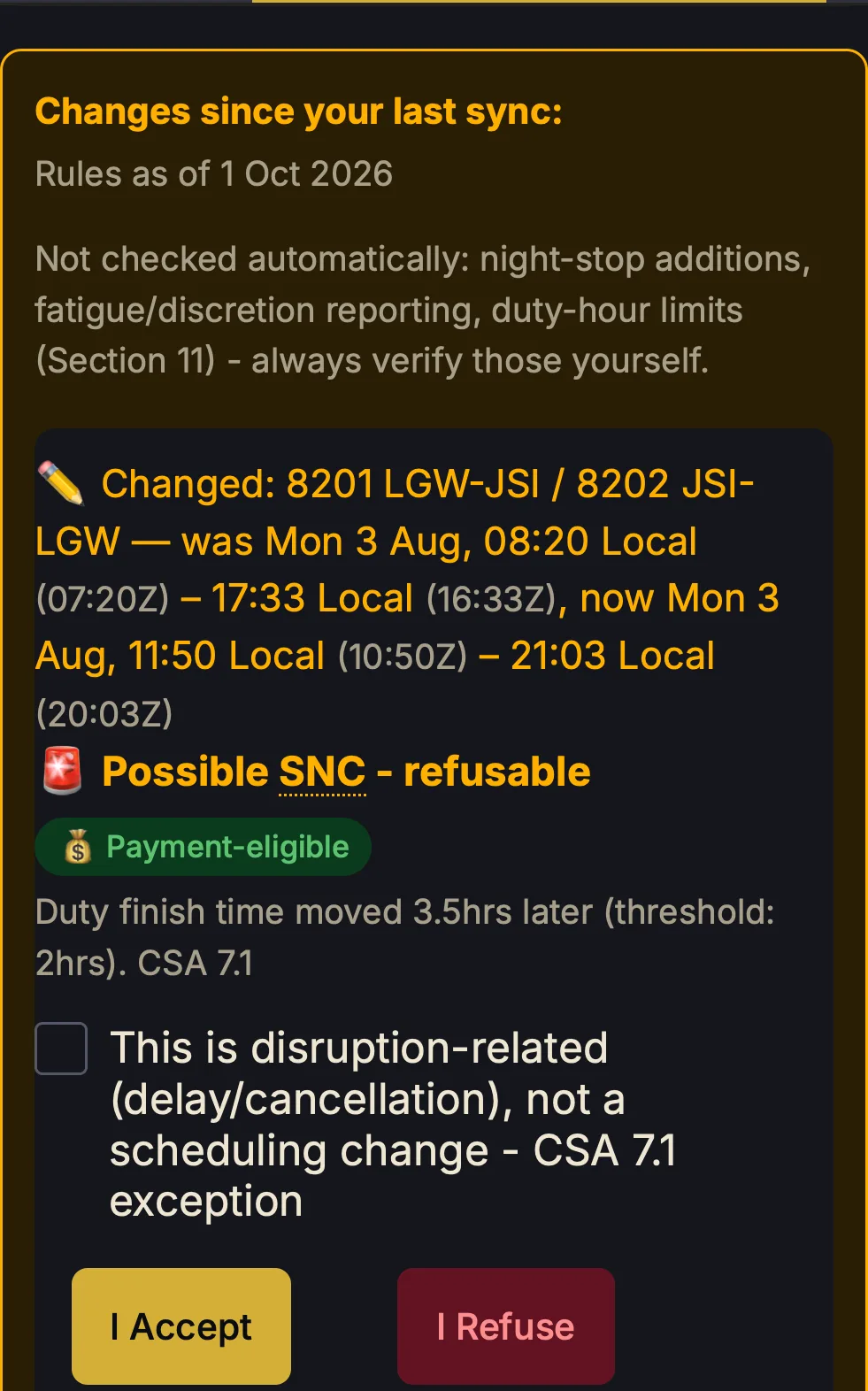
RosterGuard change review showing a duty moved from 08:20–17:33 to 11:50–21:03, flagged as a possible refusable SNC under CSA 7.1
Real app change review, captured from seeded demo data. No pilot's roster is shown.
02 / Roster

Your month, then your day.

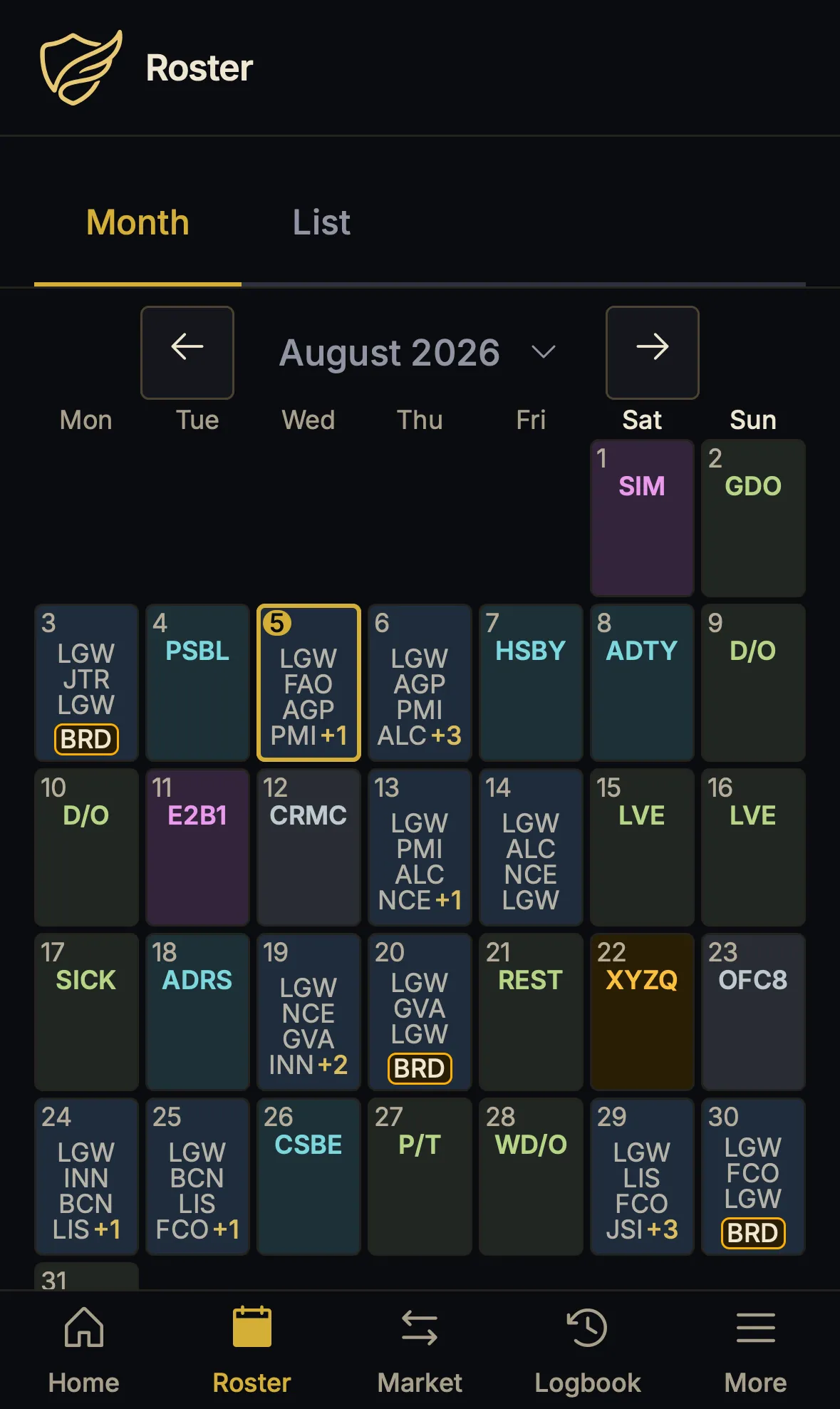
The month grid keeps the shape of the bid period in view: flights, standby, days off, training and the things that are easy to forget. Tap a day and the full sheet opens, with local and UTC times side by side.

  • Month and list views, with base, seat and aircraft detail
  • Every sector, report time and duty finish on one sheet
  • Local and UTC together — no mental arithmetic before a report
  • PDF or calendar import, with a saved roster to compare against
RosterGuard roster month view for August 2026, showing flying days, standby, days off and a highlighted duty
Real app · roster month
03 / Shift Market

A market without the group chat.

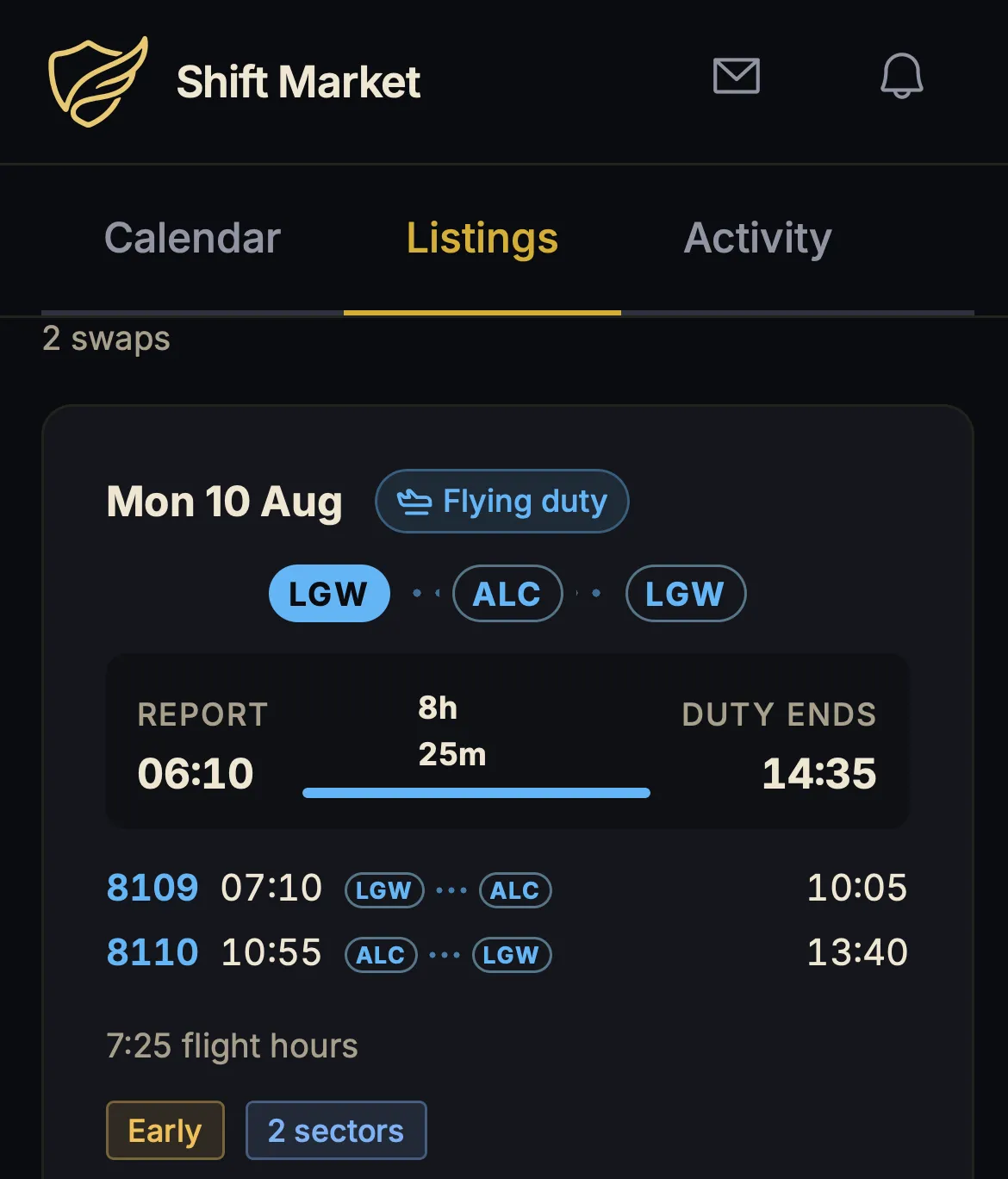
List a duty you would rather not fly, or find one that suits your week. Listings are limited to the same base and the same seat, and a trade has to be duty for duty.

  • Same base, same seat, duty-for-duty by design
  • The full duty is shown before you register interest
  • You can see when you already have no duty that day
  • A listing is not a confirmed trade — the company still has the final say
RosterGuard Shift Market listing for a London Gatwick to Alicante round trip on 10 August
Real app · Shift Market listing

Also on board

The rest of the flight bag

Logbook and map

Import flights, keep the totals, and see where the year actually went.

Pay estimates

Basic and variable pay, using the figures and rules the agreement sets out.

Flight duty period

A second pair of eyes on report time, discretion and the limits.

Weather and airports

TAFs, METARs and airport detail without leaving the duty.

Security search

The aircraft security search checklist, where you need it.

Offline once loaded

The screens and records already on your device stay readable without a signal.

Roster PDF or CSV

Bring in the eCrew PDF; the parser does the typing.

Delay codes

Find the right code before the report gets written.

Feedback that reaches a person

Questions, bugs and missing routes go to the maintainer, not a ticket queue.

04 / The honest bit

Small, independent, and free to use.

No invented quotes. No star ratings. No “trusted by thousands” banner. The evidence is the app, the agreement it cites and the people who choose to use it.

100+pilots have signed up since launch — no ad campaign, no paid acquisition.

Deliberately not

Write to eCrewContact crew controlGuarantee a swapReplace BALPA advice

RosterGuard is a small independent project. It is not a company product with a growth team behind it. That is why it can stay free, stay quiet about your data, and say “we do not know” when a rule cannot be checked automatically.

01

Built around CSA24

The short-notice-change checks, refusal limits and pay estimates use the BALPA UK Pilots Scheduling Agreement. The change review shows the clause it used, so you can check its working.

02

One account, every device

Your roster, logbook and SNC history sync to your signed-in account. The database is encrypted at rest, but this is not end-to-end encryption. Your calendar link stays on your device.

03

Free, without a second price

There is no paid tier, no trial clock and no advertising. Free does not mean your data is the product: RosterGuard does not sell it or share it with advertisers.

04

Independent by design

RosterGuard is not affiliated with easyJet or BALPA. It cannot write to eCrew, contact crew control or accept a change in the company system. It records your decision; you still action it.

There are no testimonials on this page. There are no public reviews to quote yet, so we have not written any. The screenshots are real, the app is free to try with your work email, and the CSA24 reference is there to check. That is a better test than a quote.

05 / Price

Free, with nothing waiting behind it.

RosterGuard is free. Not a free trial, not a freemium funnel, and not a launch offer with an end date you find out about later. Sign in with your work email and use the whole app.

  • Short-notice change review
  • Roster PDF and calendar import
  • Roster month and day sheet
  • Logbook and flight map
  • Pay and variable pay estimates
  • Shift Market listings
  • Offline access once loaded
  • Sync across your devices
Open RosterGuardNo card · no trial · no paid tier
Boarding pass · RG-001One way

£0 / pilot

The whole app, for as long as you fly with a verified easyJet work email. No renewal, because there is nothing to renew.

AccessVerified @easyjet.com
Card requiredNo
Paid tierNone
AdsNone
RenewalNot applicable

06 / Questions

Before you import a roster.

The short answers. If something is still unclear, the app's feedback form goes straight to the person who maintains it.

Open the app

Who is RosterGuard for?

easyJet BALPA UK pilots. It is built around CSA24, the BALPA UK Pilots Scheduling Agreement, so its short-notice-change checks, refusal limits and pay estimates use that agreement. Access requires a verified @easyjet.com work email.

Is it really free?

Yes. There is no paid tier, no subscription, no trial clock and no advertising. Sign in with your work email and use it.

Is RosterGuard affiliated with easyJet or BALPA?

No. RosterGuard is an independent project. It is not affiliated with, endorsed by or supported by easyJet or BALPA.

Does RosterGuard accept or refuse a change for me?

No. It detects a possible short-notice change, explains why with references to CSA24, and records the decision you make: Accept, Refuse or Unsure. It never writes to eCrew and never contacts crew control. You still action the decision in the company system.

Where does my data live?

Your roster, logbook, profile and SNC history are kept on your device and sync to your signed-in account so you can use another device. The database is encrypted at rest, but this is not end-to-end encryption. Your calendar link itself stays on the device; if your browser cannot fetch it, RosterGuard's server fetches and relays it. There is more detail on the Privacy page.

Read the privacy page

How does it notice that my roster changed?

Upload an eCrew PDF or connect a calendar. When a new reading differs from the roster you saved, RosterGuard flags moved report times, changed sectors or added duties and puts them in the change review. Background checks depend on what the browser allows; opening or refreshing the app is the reliable check.

What is Shift Market?

A board for same-base, same-seat, duty-for-duty trades. A listing is visible to eligible pilots, but it is not a confirmed trade. RosterGuard does not guarantee that someone will take it, that a trade will be approved, or that the company roster will change.

Do I need to install anything?

No. RosterGuard runs in your browser and can be added to your Home Screen. Once loaded it works offline for the screens and records already on your device. An iOS app is in development but is not on the App Store yet.

Ready when the roster moves

The roster will change. You'll know what moved.

Open RosterGuard on your phone, sign in with your verified @easyjet.com email, and bring the next 21:40 change into focus. Free, with no ads and no paid tier.

Free to useVerified @easyjet.com email requiredIndependent of easyJet and BALPA